










Understanding how to effectively use text elements like paragraphs, spans, and other tags is crucial in web design. This guide will explore how to use these elements in Divhunt for better control over your website's text.
Adding and styling a paragraph
- Inserting a paragraph: In your hero section or any desired area, select the parent div and add a paragraph element.
- Editing text: Double-click the paragraph or use the settings panel to input your text.
- Adjusting text spacing: To avoid text sticking to adjacent elements, add margins via the design panel for better spacing.
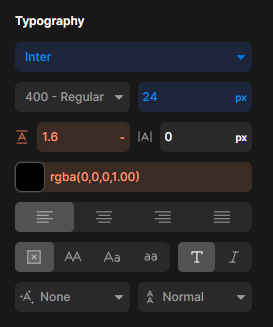
Typography options
- Text size: Bigger or smaller text sizes help make sure your words are easy to see and help sort out which parts of your page are most important.
- Font weight: Making text thicker or thinner draws attention to specific words or phrases.
- Line height: Adjusting the space between lines makes your text more comfortable to read, especially for longer paragraphs.
- Text color: Picking different colors for your text helps it stand out against the background and makes your site look nice while keeping the words easy to read.
- Text alignment: How you line up your text – to the left, center, or right – changes how your content looks and feels on the page.
- Text decoration and Style: Adding styles like italics or underlines can make certain parts of your text stand out more.
- Breaking option: Controls how text wraps or breaks. It’s especially handy when dealing with long words or URLs that might not fit neatly within the layout. This option helps maintain a clean and orderly appearance of text within your design.
Divhunt supports all HTML text tags for complete SEO control. You can access all the tags using the CTRL + E / CMD + E modal, where you can find tags like <strong>, <em>, <blockquote>, and more.