










Note: Google and other search engines may take a few days to several weeks to index your changes, so be patient.
Optimizing your page for search engines is crucial for visibility and traffic. Divhunt makes it easy to manage your page's SEO settings. Here’s how you can do it:
Access the Page SEO Settings
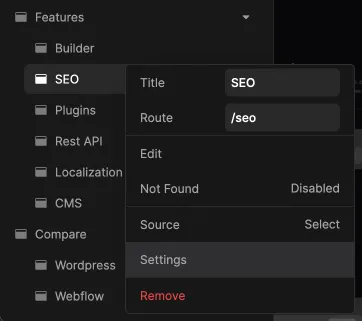
- Right-click on the page in the Pages sidebar and click on "Settings"
Meta Data Settings
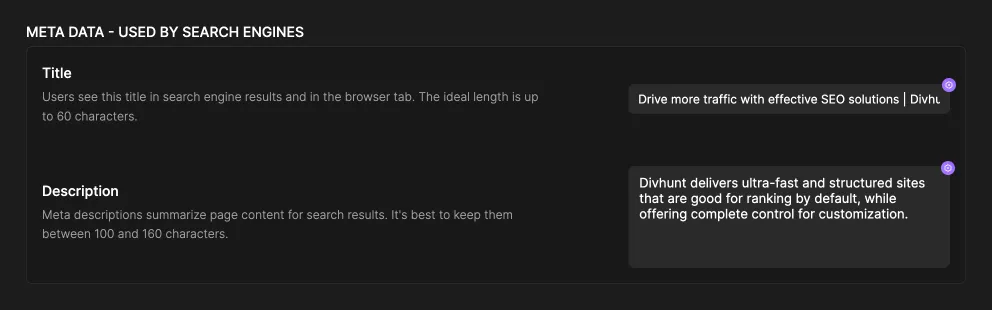
Title
- In the "Title" field, enter a brief and relevant title for your page. This title appears as the main clickable link in search engine results and in the browser's title bar.
- Keep it up to 60 characters for the best results.
Description
- In the "Description" field, provide a short, engaging snippet that describes the content of the page. This will appear below the title in search engine results.
- Keep descriptions between 100 and 160 characters.
Example of good SEO practices
Open Graph settings
Title
- This is the name of your web page when it is shared on social media sites like Facebook or Twitter.
- Keep it under 60 characters so it looks good when shared.
If you don't fill this in, it will use the "Title" from your meta data settings.
Description
- This is a short summary of your page that appears with the title when your page is shared.
- Keep it between 100 and 160 characters so it's clear and concise.
If you don't fill this in, it will use the "Description" from your meta data settings.
Image
- This is the picture that appears when your page is shared on social media.
- Use an image with a resolution of 1200x630 pixels and a size not exceeding 1MB.
If you don't choose an image, it will use the default project image.
Type
- This tells social media platforms what kind of content your page is, like a website, article, or video.
- Choose the type that best fits your content to help social media platforms understand it better.
URL
- This is the web address that people will go to when they click on your shared content.
- If you don't set this, it will use the page URL.
Indexing settings
Canonical URL
- Enter the full URL of the preferred version of your page. This helps search engines understand which version of a page to index when there are multiple versions with similar content.
- Only fill in the canonical URL if you have multiple versions of a page to avoid duplicate content issues.
- Example: 'https://www.example.com/preferred-version'
Robots
Provide instructions for search engine crawlers on how they should interact with your page.
- Index, Follow: Index the page and follow its links.
- Index, Nofollow: Index the page but don't follow its links.
- Noindex, Follow: Don’t index the page but follow its links.
- Noindex, Nofollow: Don’t index the page and don’t follow its links.
Tip: Use Index, Follow for important pages and Noindex, Nofollow for pages you don't want in search results.