


What are variables
In Divhunt, all dynamic data is stored and managed through a unified variable sharing system. This means that whether you're working with the native Divhunt CMS, REST API, or future features like memberships and e-commerce, the process is the same. Learning how to use this system with the CMS, for example, will equip you to use it seamlessly across all other features.
Where can you use variables
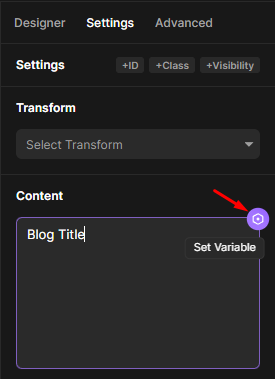
You can use variables almost everywhere except in the designer (styling) tab. Variables can be applied to many elements, such as text content, images, attributes, conditional visibility, SEO settings, custom code, and more. In most areas where variables can be applied, you will see a small "Set variable" icon on the top right. Clicking this icon will open a popup with all the available variables.
Types
Variables in Divhunt are divided into three categories: Custom, Page, and System.
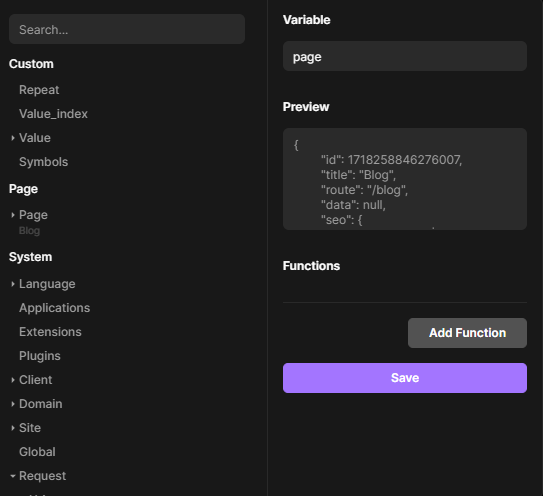
- Custom: This category includes data coming from a Source or Iterable applied to a selected element or a parent element.
- Source: When you add a Source to a specific element, such as a "Blog Post," the data of that post is stored in the variable "Value". You can then connect data from there. Learn more about source here.
- Iterable: When using Iterable functionality, you will be asked to input a key. For example, if we are listing categories, we would use the key name "category." In our variables, we will have a variable "Category" where all data from Iterable is stored.
- Page:
- Defaults: By default in Page variable you can find data of this page such as route, title, seo and more in case you need to show it on page.
- Data: When you set a Source on a specific page, you are indicating to Divhunt that this page will display dynamic data. That data is being stored in this variable. The content in this variable will depend on parameters in the URL, such as a slug or ID. This allows the page to dynamically display data based on the provided URL parameters. Learn more about source here.
- System: By default, you have access to several global variables provided by Divhunt, which you can use creatively. For example, the Request variable stores data about the user accessing your website, such as their browser, IP address, and whether they are a bot. Using conditional visibility, you can choose to hide specific information or even the entire website from certain users, IP addresses, locations, and more.
And the power of variables doesn’t stop there. You can apply pre-defined functions or custom JavaScript functions to your data, allowing you to manipulate how it is displayed. Learn more in the next lessons.
Functions
Once you have a variable, you can use functions to manipulate the data. For example, you can format dates, shorten text, display text length, calculate reading time, and much more.
Built-in functions
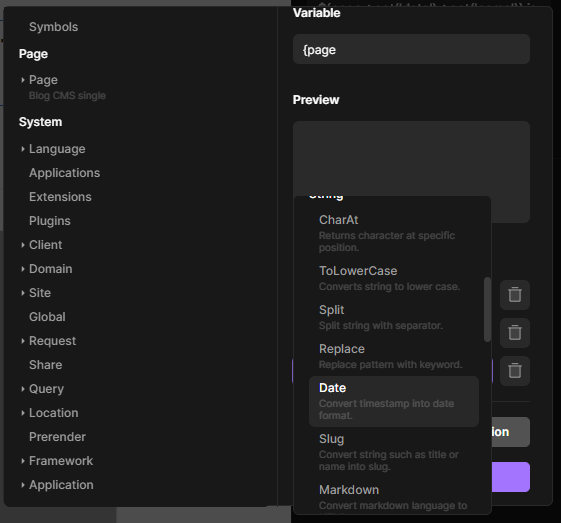
Divhunt comes with many built-in functions by default, so you don't need to write everything manually. These functions include slug generation, date formatting, character replacement, and more.
Custom functions
If you are a JavaScript developer, you don't need to rely solely on the default functions that Divhunt offers; you can create your own. For better understanding, watch the video at the top of this post at timestamp 11:41.
Here's how this works.
- Call a Function: After selecting a variable, you will call a function. In the screenshot below, we are calling the custom function 'custom-date-format' after selecting a date (data->created).
- Create a file with the exact same name 'custom-date-format' with the extenstion of 'Function'.
- Now inside of this file you have access to data of variable that was called just before our function. This data is being stored in variable 'data.value'.
- Use this variable and javascript to do anyhing you like with the contnet, in our case to format the date.
- Last line of your code should be a return. Whatever you have in return it will be displayed on a page. (Screenshot 2 - example of a function with use of data.value and return statement).
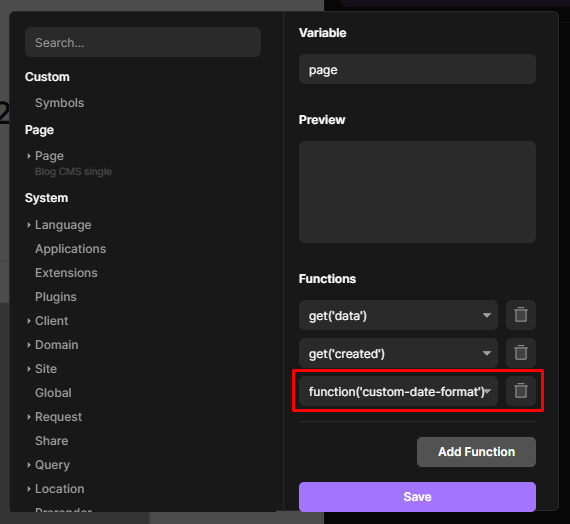
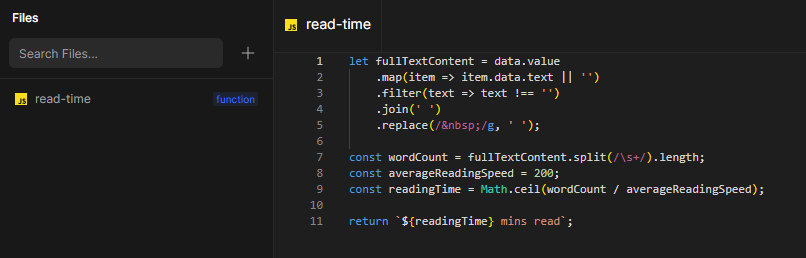
Table of content
Create your website visually – fast and easy.
Build a stunning website with ease using our visual builder. No experience needed – just drag, drop, and launch your site today.
Build and publish websites for free
Build and host your site with a custom domain for free. Upgrade anytime for expanded limits.
Build for free

Divhunt - Build websites. Faster. Better. Visually.


©2026 Divhunt GmbH. All Rights Reserved.

Built in Divhunt
We use cookies.
By clicking “Accept All”, you agree to the storing of cookies on your device to enhance site navigation, analyze site usage, and assist in our marketing efforts. View ourCookie Policyfor more information.
Optahunt
Preferences
Manage your cookie preferences.
Essentials
Always Active
These are required for the website to work, like remembering your privacy settings, keeping you logged in, or enabling secure payments.
Performance
These help us understand how people use our site (like which pages are most popular) so we can make improvements.
Personalization
These allow the site to remember your preferences (such as language or region) and provide enhanced features.
Advertising & Targeting
These are used to deliver ads more relevant to you, limit how often you see them, and measure campaign performance.
Save my preferences
You can always change these settings later via ourCookie Policy pagepage, or via the cookie widget placed at the bottom left of the page.