


How to format a Date
When working with dates in most cases including our CMS and most 3rd party REST APIs, you will be getting date in format of "ISO 8601" which looks like this: 2024-06-11T10:59:36.
With Divhunt you are able to natively format dates with use of a function date. And providing it with desired format.
At this moment, this function is very limited, it provides you only options for showing Day, Month and a Year. If you need more advanced settings, you are able to use Moment.js plugin to format your dates.
On the screenshot below, you can see that we used function "date(D M, Y)" , and this will return us a format of "10 January, 2024".
- D stands for a Day (number)
- M stands for a Month (string)
- Y stands for a year (number)
- You are able to use charachters in between, in my case I used comma (,) after a month name.
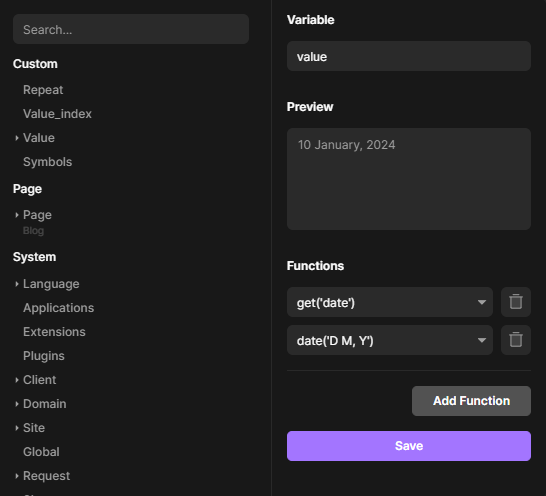
Table of content
Create your website visually – fast and easy.
Build a stunning website with ease using our visual builder. No experience needed – just drag, drop, and launch your site today.
Build and publish websites for free
Build and host your site with a custom domain for free. Upgrade anytime for expanded limits.
Build for free

Divhunt - Build websites. Faster. Better. Visually.


©2026 Divhunt GmbH. All Rights Reserved.

Built in Divhunt
We use cookies.
By clicking “Accept All”, you agree to the storing of cookies on your device to enhance site navigation, analyze site usage, and assist in our marketing efforts. View ourCookie Policyfor more information.
Optahunt
Preferences
Manage your cookie preferences.
Essentials
Always Active
These are required for the website to work, like remembering your privacy settings, keeping you logged in, or enabling secure payments.
Performance
These help us understand how people use our site (like which pages are most popular) so we can make improvements.
Personalization
These allow the site to remember your preferences (such as language or region) and provide enhanced features.
Advertising & Targeting
These are used to deliver ads more relevant to you, limit how often you see them, and measure campaign performance.
Save my preferences
You can always change these settings later via ourCookie Policy pagepage, or via the cookie widget placed at the bottom left of the page.