Last chance to get lifetime deal


Table of contents
Newest updates
AI Updates
Meet GSAP AI Agent — vibe-code your animations
Pricing update and changes to the free plan
Lifetime access stays open a little longer
The Divhunt lifetime deal is back, closing July 1
Bring Your Own AI: Connect OpenRouter
its been a year... we have a lot to show you
CMS Dynamic Filters
CMS Pagination
Layers Update - Collapse & Toggle Details
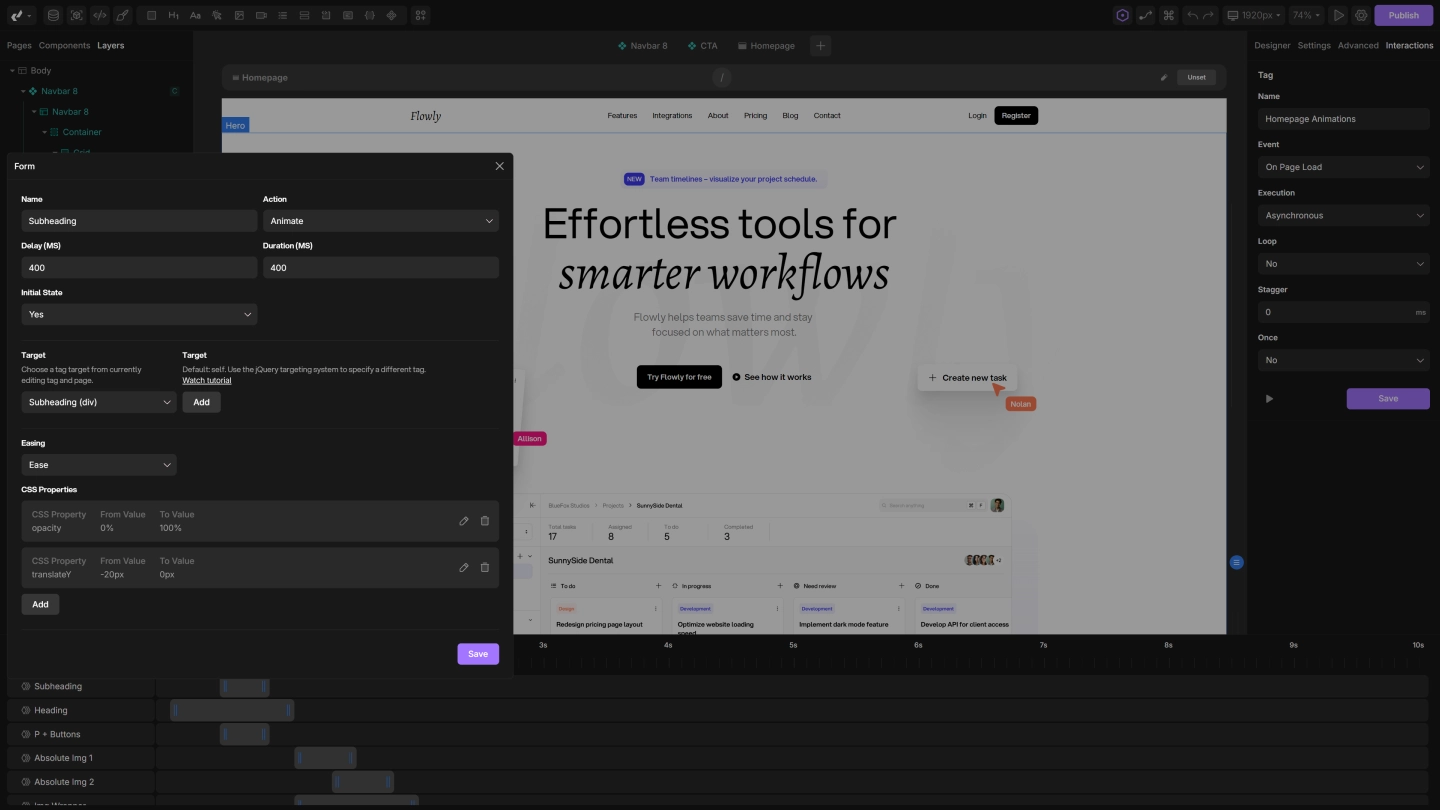
Divhunt now introduces Timeline-Based Interactions and Animations, a feature designed to give you total creative control. This system empowers you to create dynamic, interactive, and engaging experiences—all visually, with no coding required.
With its rich set of triggers and actions, this system is more than just a tool for animations—it’s a step toward building fully interactive web apps that respond intuitively to user actions.
Unlock the full potential of interactions
This isn’t a one-size-fits-all system. The flexibility of this feature allows you to trigger animations and interactions based on almost anything happening on your website, including:
Unlock the full potential of interactions
This isn’t a one-size-fits-all system. The flexibility of this feature allows you to trigger animations and interactions based on almost anything happening on your website, including:
- Scroll Events: Trigger animations as users scroll through the page, creating dynamic effects tied to their scrolling progress.
- On View: Animate elements as soon as they come into the viewport.
- Hover and Click: Bring your designs to life with hover effects and click-triggered interactions for buttons, links, or any element.
- Form Events: Trigger animations when forms are submitted, inputs change, or even while typing in a field.
- Input and Change Events: Make forms and other interactive elements react instantly as users interact with them.
- Custom Interactions: Use advanced targeting and custom events to create behaviors tailored to your needs.
- While Scrolling: Design animations that sync seamlessly with scroll progress, like parallax effects or fixed animations.
- Double Click or Focus Events: Dive even deeper with triggers like double-click or when an element is focused, opening up even more creative possibilities.
- And That’s Not All: These are just some of the possibilities. There’s even more to explore, with advanced events, triggers, and options that allow you to push your creativity further than ever.
Why it’s so powerful
This isn’t just about adding animations—it’s a full-featured interaction system with features like:
- Timeline Control: Visually manage every animation with an intuitive timeline. Adjust delays, durations, and sequence layers effortlessly.
- Unlimited Customization: Use any CSS property—opacity, transforms, colors, scaling, and more—to design animations that look and feel exactly how you want.
- Flexible Targeting: Apply interactions to specific elements, entire sections, or dynamically select elements with jQuery for precise control.
- Event Flexibility: Combine multiple events and actions to create layered, complex interactions that adapt to user behavior.
- Web App Functionality: This system isn’t just about making your site look good—it’s a step toward building web apps with true interactivity.
Learn how to get started
We’ve launched an Introduction Course to help you explore the basics of this feature:
- How to set up animation events and triggers.
- Adding and customizing actions for any element.
- Using the timeline to organize and adjust animations visually.
- Building your first complete animation from start to finish.
What’s next?
This introduction is only the beginning. We’re working on advanced tutorials to cover every event, action, and creative use case so you can unlock the full power of Divhunt’s Timeline-Based Interactions and Animations feature, we’ll guide you through every step.
Try it now
The Timeline-Based Interactions and Animations feature is live and ready for you to explore. Start creating animations and interactions that are dynamic, responsive, and completely unique.
Build and publish websites for free
Build and host your site with a custom domain for free. Upgrade anytime for expanded limits.
Build for free

Divhunt - Build websites. Faster. Better. Visually.


©2026 Divhunt GmbH. All Rights Reserved.

Built in Divhunt
We use cookies.
By clicking “Accept All”, you agree to the storing of cookies on your device to enhance site navigation, analyze site usage, and assist in our marketing efforts. View ourCookie Policyfor more information.
Optahunt
Preferences
Manage your cookie preferences.
Essentials
Always Active
These are required for the website to work, like remembering your privacy settings, keeping you logged in, or enabling secure payments.
Performance
These help us understand how people use our site (like which pages are most popular) so we can make improvements.
Personalization
These allow the site to remember your preferences (such as language or region) and provide enhanced features.
Advertising & Targeting
These are used to deliver ads more relevant to you, limit how often you see them, and measure campaign performance.
Save my preferences
You can always change these settings later via ourCookie Policy pagepage, or via the cookie widget placed at the bottom left of the page.