Last chance to get lifetime deal


Table of contents
Newest updates
AI Updates
Meet GSAP AI Agent — vibe-code your animations
Pricing update and changes to the free plan
Lifetime access stays open a little longer
The Divhunt lifetime deal is back, closing July 1
Bring Your Own AI: Connect OpenRouter
its been a year... we have a lot to show you
CMS Dynamic Filters
Layers Update - Collapse & Toggle Details
CMS Pagination
You can now create and manage custom roles for your team in Divhunt:
- Create custom roles: Name your roles to match your team's needs.
- Set permissions: Control what each role can do, including editing content, managing collections, accessing the designer, publishing, SEO, and much more.

- Assign roles: Easily assign these roles to team members when adding them to a project.
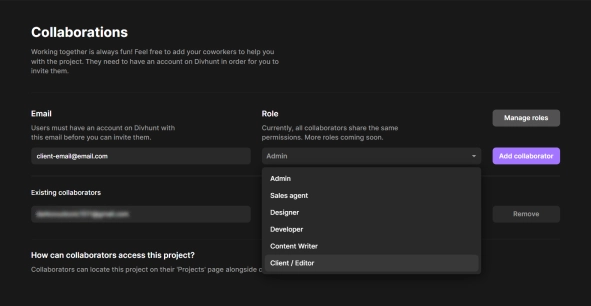
Manage your roles by going to Dashboard panel > Organization > Roles.
Assign these roles to collaborators through Individual project settings > Collaborators.
This update helps you manage your team better and keeps your projects secure. Try it out today!
Build and publish websites for free
Build and host your site with a custom domain for free. Upgrade anytime for expanded limits.
Build for free

Divhunt - Build websites. Faster. Better. Visually.


©2026 Divhunt GmbH. All Rights Reserved.

Built in Divhunt
We use cookies.
By clicking “Accept All”, you agree to the storing of cookies on your device to enhance site navigation, analyze site usage, and assist in our marketing efforts. View ourCookie Policyfor more information.
Optahunt
Preferences
Manage your cookie preferences.
Essentials
Always Active
These are required for the website to work, like remembering your privacy settings, keeping you logged in, or enabling secure payments.
Performance
These help us understand how people use our site (like which pages are most popular) so we can make improvements.
Personalization
These allow the site to remember your preferences (such as language or region) and provide enhanced features.
Advertising & Targeting
These are used to deliver ads more relevant to you, limit how often you see them, and measure campaign performance.
Save my preferences
You can always change these settings later via ourCookie Policy pagepage, or via the cookie widget placed at the bottom left of the page.