Last chance to get lifetime deal





Table of contents
Newest updates
AI Updates
Meet GSAP AI Agent — vibe-code your animations
Pricing update and changes to the free plan
Lifetime access stays open a little longer
The Divhunt lifetime deal is back, closing July 1
its been a year... we have a lot to show you
CMS Dynamic Filters
Layers Update - Collapse & Toggle Details
CMS Pagination
Custom code is no longer available on the free plan
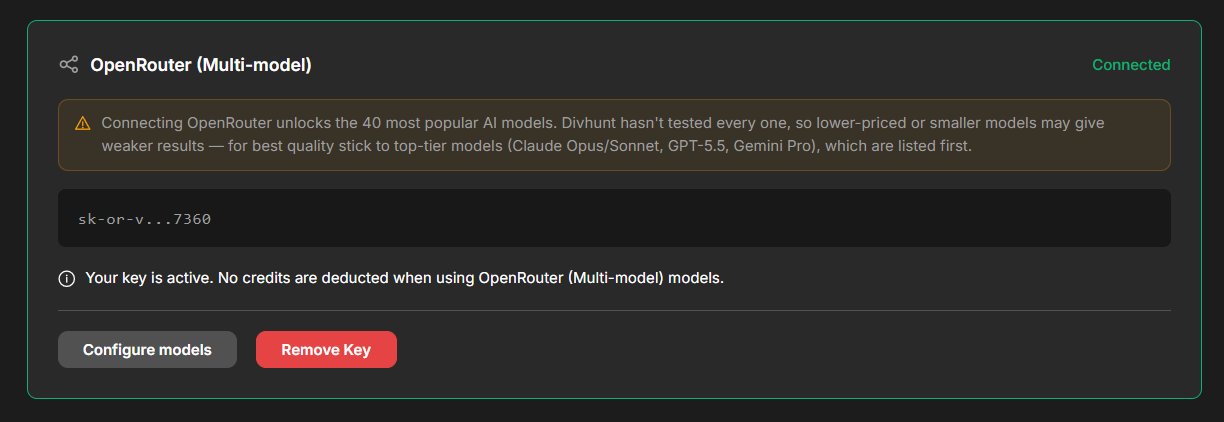
We just shipped one of our most-requested AI features: OpenRouter support. You can now plug your own OpenRouter API key into Divhunt and run the AI builder on virtually any model you want — Claude, GPT, Gemini, DeepSeek, Llama, Mistral, Qwen, and hundreds more — all through a single key, billed directly to your own account.
If you've ever wished you could pick exactly which AI model powers your site generation, this is for you.
Note: New projects will receive the update automatically. For existing projects, you can force the update by reinstalling any plugin. We will also gradually roll out the update to all existing projects over the next few days.
What is OpenRouter?
OpenRouter is a single gateway to hundreds of AI models from every major provider. Instead of juggling separate accounts and API keys for OpenAI, Anthropic, Google, and the rest, you get one key that reaches them all. It's become the go-to way for people to experiment freely across models without lock-in.
Now that key works inside Divhunt.
What this unlocks
- One key, hundreds of models. Connect a single OpenRouter key and every supported model becomes available in Divhunt's AI dropdowns.
- Your account, your billing. Usage is billed directly to your OpenRouter account, not Divhunt credits. You're fully in control of spend.
- Total model freedom. Want to generate with Claude Opus today and a budget model tomorrow? Switch any time, right from the model selector.
- No lock-in. Bring your key, remove it whenever you like. Nothing is tied down.
How to set it up
It takes about a minute:
- Head to AI settings → Bring Your Own Key in your Divhunt dashboard.
- Grab your API key from openrouter.ai/keys (it starts with sk-or-).
- Paste it into the OpenRouter card and click Connect.
- That's it — OpenRouter models now appear in every AI model dropdown across the builder.
From that point on, any AI generation you run uses your chosen OpenRouter model and bills to your OpenRouter account.
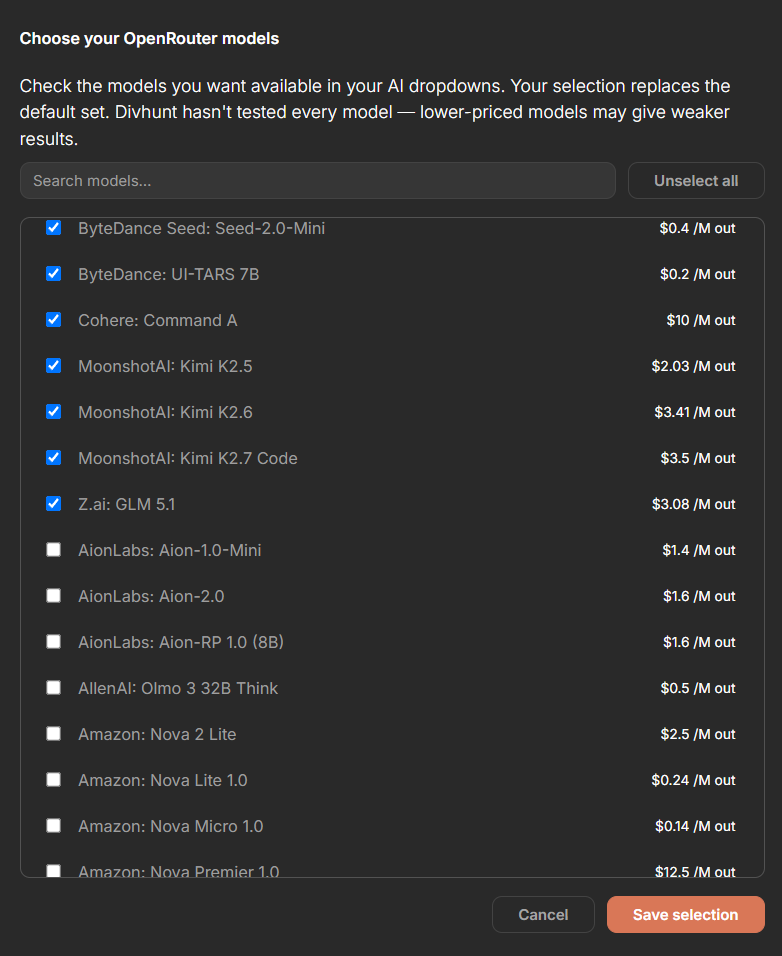
Choose exactly which models you see
Hundreds of models is powerful, but you don't want to scroll through all of them. By default we show a curated set of the strongest and most popular models, with the top-tier ones first.
A note on quality
Because OpenRouter opens the door to hundreds of models, it's worth being honest: we haven't tested every single one against Divhunt's AI builder. The big flagship models (Claude, GPT, Gemini) produce excellent results, but smaller or cheaper models can be hit-or-miss for complex layout generation. For the best output, stick to the top-tier models; experiment with the rest at your own pace.
Build and publish websites for free
Build and host your site with a custom domain for free. Upgrade anytime for expanded limits.
Build for free

Divhunt - Build websites. Faster. Better. Visually.


©2026 Divhunt GmbH. All Rights Reserved.

Built in Divhunt
We use cookies.
By clicking “Accept All”, you agree to the storing of cookies on your device to enhance site navigation, analyze site usage, and assist in our marketing efforts. View ourCookie Policyfor more information.
Optahunt
Preferences
Manage your cookie preferences.
Essentials
Always Active
These are required for the website to work, like remembering your privacy settings, keeping you logged in, or enabling secure payments.
Performance
These help us understand how people use our site (like which pages are most popular) so we can make improvements.
Personalization
These allow the site to remember your preferences (such as language or region) and provide enhanced features.
Advertising & Targeting
These are used to deliver ads more relevant to you, limit how often you see them, and measure campaign performance.
Save my preferences
You can always change these settings later via ourCookie Policy pagepage, or via the cookie widget placed at the bottom left of the page.