











Accordions
Effortlessly create an FAQs section or similar using accordions transform. A few simple clicks, and you're all set.
Watch the video tutorial on YouTube
Got a bunch of FAQs or heaps of details about your products that you need to fit neatly on your website? The Accordion plugin is just the thing you need. Your visitors can just click and see the details they need, one at a time, thanks to the nifty 'Single Mode'. And you can even decide which sections are open from the get-go with the 'Start Open' feature. It's perfect for keeping your site looking sharp and your visitors happy, without getting lost in a sea of information.
Instructions
Installation
- Go to your Divhunt project's settings.
- Navigate to 'Browse Plugins' and install the 'Accordions' plugin.
Drag & Drop pre-made block
- In the Builder, navigate to top left bar, and click on elements icon.
- Find and drag & drop accordions block from blocks list to your page.

Create structure manually
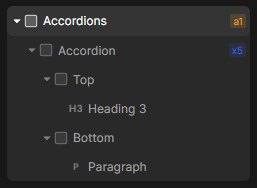
- Create a div (accordions) on which we are going to apply transform later.
- Inside of 'accordions' create div (accordion). You can have unlimited accordion items, this is great place to utilize our loop feature.
- Each 'accordion' item must contain two divs: a top part and a bottom part. The Top part serves as the clickable area of the accordion. When a user clicks on it, it triggers the toggle action for the current accordion item. The bottom part is the toggleable section of the accordion, where the content is either shown or hidden based on the user's interaction with the Top part.
- Inside of top & bottom part, you can put whatever you like.
Set transform (if created manually)
- Select 'accordions' div, navigate to 'Settings' panel, and set transform to 'Accordions'.
Adjust settings
- Start Open: Specify which items should be open by default. For example, use '1,3,5' to open the first, third, and fifth items.
- Open all: Open all by default.
- Single Mode: In this mode, only one accordion item can be viewed at a time. Clicking on a new item will automatically close the previously opened one.
- Duration: Duration of slide down/up animation.
Youtube Embed
Easily embed a YouTube video and customize it with a user-friendly interface, including settings like aspect ratio, autoplay, mute, and more in just a few seconds.
Divhunt
Image Hover Effect
Create a stunning transition between two images when the user hovers over a specific tag on the page.
Divhunt
Simple Scroll Animations
Add simple fade in effects to your elements. Simple, yet powerful. Allowing you to choose direction, duration, delay and offset.
Divhunt
Scroll to top
Easily add a smooth scroll-to-top button for quick navigation.
Divhunt